
Pinhole Magnifier
Grade Levels
10th Grade, 11th Grade, 12th Grade
Course, Subject
Related Academic Standards
Content Provider
To Do and Notice
Hold the card near your eye and look at the light bulb several feet away. Move closer to the bulb until you almost touch it, and notice the magnified writing on the bulb. Use the pinhole magnifier to examine other small brightly lit objects. You can, for example, examine a computer screen or a television screen up close using a pinhole magnifier.
Try using pins or needles with different diameters to make different-sized holes. Notice that the smaller the pinhole is, the dimmer your view. As the pinhole is made smaller, the image at first becomes sharper, but then is blurred by diffraction.
You can even form a pinhole by curling your index finger. Or try this as a magnifier:
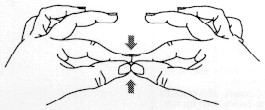
Try using pins or needles with different diameters to make different-sized holes. Notice that the smaller the pinhole is, the dimmer your view. As the pinhole is made smaller, the image at first becomes sharper, but then is blurred by diffraction.
You can even form a pinhole by curling your index finger. Or try this as a magnifier:
Description
A pinhole in an index card can act like a magnifying glass, helping your eye focus on an object that is very close to you. However, by limiting the amount of light that reaches your eye from the object, the pinhole also makes the object appear dimmer.
Materials
- A 3 x 5 inch (8 x 13 cm) file card.
- A straight pin or needle.
- Aluminum foil.
- A lamp with dim (10 to 25 watt) light bulb.
- Masking tape.
- X-Acto™ knife, matte knife, or scissors.
- Adult help.
Duration
20 - 25 minutes
Assembly
Cut a hole about 1 inch (2.5 cm) square in a file card. Tape a piece of aluminum foil over the hole in the card and use the pin to punch a hole in the center of the foil. You can make a good pinhole by placing the foil on a thick piece of cardboard and rotating a needle.
Content Collections
What's Going On?
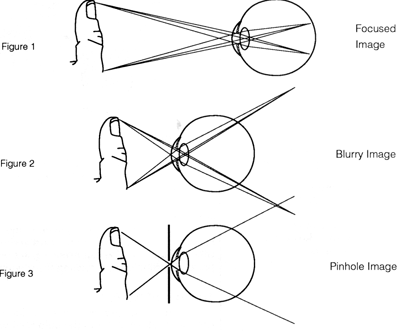
The pinhole magnifier works on a very simple principle: The closer you get to an object, the bigger it looks to you. This is because the closer you are to the object, the larger the image the object forms on your retina (see Figure 1). Unfortunately, however, there is a limit to this. If you get too close to the object, your eye is not able to bend some of the light rays enough to obtain a focused image. As a result, the image becomes blurry or fuzzy (see Figure 2). The pinhole magnifier gets around this problem by limiting the rays that come to you from each part of the object (see Figure 3).
Sadly, there is a trade-off between the resolution, or sharpness, of the image and its brightness. A tiny pinhole produces a very sharp image, but because it cuts down on the number of rays that enter your eye, the pinhole makes the object look much dimmer.
Sadly, there is a trade-off between the resolution, or sharpness, of the image and its brightness. A tiny pinhole produces a very sharp image, but because it cuts down on the number of rays that enter your eye, the pinhole makes the object look much dimmer.
Etcetera
By using a pinhole magnifier, nearsighted people who normally see things fuzzily at a distance will be able to see them clearly; likewise, farsighted people who normally see things fuzzily close up will be able to see them clearly.